Most migrations start with a performance graph. Ours started with an error message: you cannot add another column to this table.
AdDailyFacts — ADF, to everyone who has ever worked on it — is the table nearly everything at DeltaX eventually reads from. Impressions, clicks, cost, conversions, video quartiles, app installs, and a long tail of publisher-specific numbers, one row per ad per day per device per age group per gender. Reports read it. Dashboards read it. The API reads it. Roughly forty background services write to it.
This is the story of moving it to columnstore, the idea we killed along the way, and the worker we got to delete at the end.
The table that ran out of columns
Open the stored procedure that merges data into ADF and the first hundred lines are not code. They’re a changelog going back to 2013:
17-Jun-2016     KN      Adding a column for mobile app installs
23-Dec-2019     SND     Adding 40 integer columns and 38 decimal columns
16-Feb-2021     PK      Adding 10 more decimal columns
11-Jun-2021     CS      Adding 15 integer and 3 decimal columns for shared metrics
Twelve years of “just one more metric.” And somewhere in the middle of it, the names stopped meaning anything. The early columns say what they hold. The later ones are numbered slots — generic integer and decimal columns, added in blocks and handed out one at a time to whoever needed somewhere to put the next number. By the end we weren’t modelling data, we were allocating storage. That’s what tech debt looks like when it finally becomes visible.
SQL Server allows 1,024 columns in a rowstore table. We reached it.
That’s the part worth sitting with. A slow table is a problem you can schedule. A full table is a problem that blocks the next feature — the next publisher integration had nowhere to put its numbers.
Why columnstore, and what it costs you
A clustered columnstore index stores data by column rather than by row, slicing the table into rowgroups of about a million rows and compressing each column within a rowgroup separately. Microsoft’s own framing is worth quoting, because it describes our table almost exactly: columnstore indexes are “the standard for storing and querying large data warehousing fact tables.”
Almost every query that reaches ADF has the same shape. Nobody asks for one complete row with all thousand of its columns. They ask for a handful of measures — impressions, clicks, cost, conversions — added up across a range of dates. Columnstore is built for exactly that: it reads only the columns you named and skips the rest of the table on disk entirely, which is why a report that touches four measures doesn’t care how many hundreds of other columns exist.
That’s what we stood to gain. Here’s the full ledger, gains and costs together:
| Rowstore | Columnstore | |
|---|---|---|
| Large inserts | Fast | Fast — often faster, thanks to compression |
| Updates | Fast | Much slower |
| Aggregates | Slower | Much faster |
| Compression | Modest | Very efficient |
| Column limit | 1,024 | 30,000+ |
It’s worth being precise about that write row, because “columnstore is slow to write” is one of those things everyone repeats and almost nobody qualifies. Inserting into a columnstore index in bulk is genuinely fast — SQL Server’s data loading guidance calls it “the most performant way to move data into a columnstore index.” Batches of 102,400 rows or more skip the deltastore entirely and land directly in compressed rowgroups, and because they’re compressed on the way in, there’s dramatically less transaction log to write. Compress ten times and you write roughly a tenth of the log.
Updates are the expensive half. And that distinction — inserts cheap, updates costly — turned out to be the single most important fact about this migration. ADF is written to constantly, by dozens of services, all day. Almost all of that traffic is publishers restating numbers for days we already have, which is to say: updates.
Splitting one table into two
The first insight was that ADF wasn’t only too wide — it was also enormously repetitive. Every row carried its dimension values (AdId, Date, DeviceId, Gender, AgeGroupId, SocialActionTypeId) alongside its metric values, and those dimension values repeated across every metric row that shared them.
So we split it:
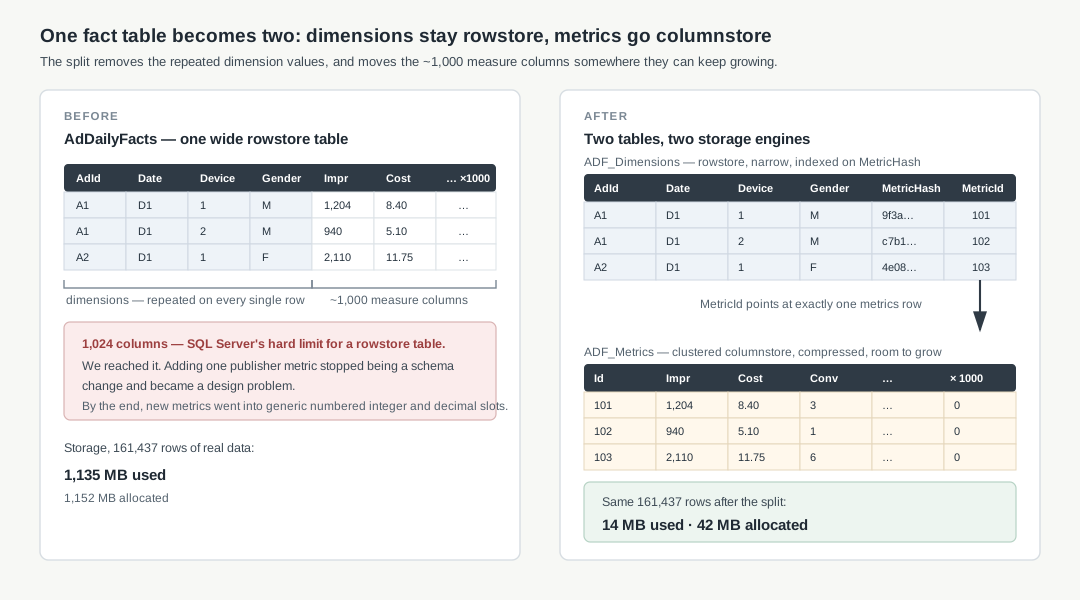
ADF_Dimensions stays rowstore. It’s narrow, it’s the thing you filter and join on, and rowstore with ordinary indexes is exactly right for lookups. It holds the keys, the date, the breakdown columns, a MetricHash, and a MetricId.
ADF_Metrics is a clustered columnstore. It holds the measures — all thousand-ish of them — plus its own Id.
The MetricHash is an MD5 over the dimensions and the metrics of a row. It’s a fingerprint: if anything about a fact changed, its hash changed. MetricId is the pointer from a dimension row to the metric row that currently holds its numbers.
The storage result, on 161,437 rows of real data:
| Table | Space used | Space allocated |
|---|---|---|
| AdDailyFacts (rowstore) | 1,135 MB | 1,152 MB |
| ADF_Dimensions (rowstore) | 3 MB | 4 MB |
| ADF_Metrics (columnstore) | 11 MB | 38 MB |
At 10,000 rows the same comparison was only about a 3× saving, not an 80× one. That’s not noise — it’s how columnstore works. Rows arrive in the deltastore and only get compressed into rowgroups once there are enough of them. Small tables see almost none of the benefit. Large ones see a lot. Ours is a very large one.
We stopped updating and started pointing
Then we tried to write to it, and the numbers were bad.
| Operation | Rowstore | Columnstore |
|---|---|---|
| Merge 140k rows into empty tables | 135s | 290s |
| Merge after 10k updates + 20k new rows | 106s | 401s |
Four hundred seconds. That’s the honest starting point, and it’s the point where a lot of migrations get quietly shelved.
The problem was the MERGE — specifically its update branch.
SQL Server cannot change a row that’s already sitting inside a compressed rowgroup. So an UPDATE against a columnstore index isn’t really an update at all. The documentation puts it plainly: SQL Server “marks the row as logically deleted and then inserts the updated row into the deltastore.” You pay for a delete and an insert — and the compressed rowgroup keeps carrying the dead row until the index is rebuilt.
Read that mechanism again and the fix suggests itself. If the storage engine is going to turn our update into an insert plus a tombstone anyway, we may as well do it ourselves — deliberately, where we control the bookkeeping.
So we stopped updating. Instead, every incoming fact gets classified first:
UPDATE  Target
SET Mode = CASE
        WHEN Source.MetricHash IS NULL               THEN 'INSERT'
        WHEN Source.MetricHash =  Target.MetricHash  THEN ''
        WHEN Source.MetricHash <> Target.MetricHash  THEN 'UPDATE'
    END,
    MatchedDimensionId = Source.Id
FROM RotationTable Target
LEFT JOIN ADF_Dimensions Source
       ON /* the business key */
Three outcomes. INSERT means we’ve never seen this fact. Blank means the hash matches and the numbers haven’t moved — skip it entirely, which turns out to be most rows on most runs. UPDATE means the numbers changed.
And an “update” is no longer an update:
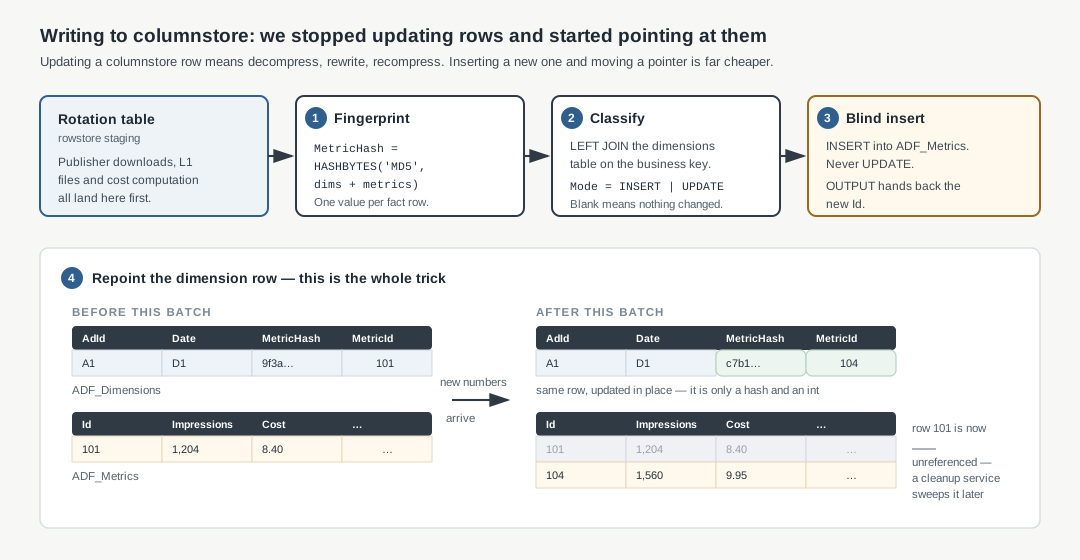
So when the numbers for a fact change, we don’t update its metric row. We insert a new one — blindly, without reading the target table first. OUTPUT hands back the Id of the row we just inserted, and we write that Id into the dimension row. The dimension row now points at the new metric row instead of the old one.
The dimension row does get updated in place. But it sits in a rowstore table, and we’re only changing two small values — a hash and an integer. That update is cheap.
This is close to what SQL Server already does on its own. When you update a columnstore row, it marks the old row as deleted and writes the new version to the deltastore. We are doing the same thing, one level up: the old metric row stays where it is, the new one goes in beside it, and a pointer decides which is current.
The difference is that the pointer is a column we control. So we can insert in large batches, and we can pick when the old rows get cleaned up.
That, plus a non-clustered index on MetricHash, is what made it viable:
| Operation (10k rows) | Before | After |
|---|---|---|
| Dimensions insert + update | 181s | 6s (index on MetricHash) |
| Metrics insert | 315s | 32s (same index) |
Metrics insert, blind via Mode |
— | 26s |
| Cleaning stale metric rows | 20s | 5s |
There’s no free lunch here, and it’s worth being clear about the bill. Every superseded metric row is still sitting in the table, unreferenced — and deleting one doesn’t reclaim its space either, it just adds another entry to the delete bitmap. So we run a cleanup service to sweep orphans, and periodic index rebuilds behind it to actually compact the rowgroups, with statistics updates to follow. We traded a write cost we couldn’t afford for a housekeeping cost we could schedule.
The idea that didn’t survive contact
Here’s the shortcut we really wanted to work.
If ADF_Dimensions and ADF_Metrics could be joined behind a view called Adf that exposed every column the old table had, then nothing downstream needs to change. Not the reports, not the stored procedures, not the API. Swap the table for a view, done. Weeks of work avoided.
We built it and measured it. A year of data, broken down by ad, by date, by age group, by gender — 128,583 rows:
| Query shape | Rowstore table | Columnstore view |
|---|---|---|
| 30 days | 2.6s | 7.2s |
| 60 days | 1.6s | 7.0s |
| 1 year | 8.8s | 20.6s |
Two and a half times slower than the thing we were replacing.
The reason is the same reason columnstore is fast in the first place. It wins by reading only the columns a query actually names, and by skipping whole segments that can’t match the filter. Our view named all thousand columns. So every query that went through it paid for the join, materialised every column, and gave up segment elimination entirely. We had rebuilt the rowstore table, only slower.
What actually worked was the opposite instinct: select only the columns we needed, join dimensions to metrics, and filter and group on the dimensions table’s Date. Averaged over five runs, the same report went from 10s on rowstore to 3s on columnstore. And narrow purpose-built views for the grid procedures came out level with rowstore (6.8s vs 7.4s), which was good enough for those.
So the shortcut was gone. Every consumer had to be opened up and rewritten. That’s the moment this stopped being a database change and became an organisational one.
The surprise in the execution plan
We kept two business profiles side by side for the whole migration — one still on rowstore, one on columnstore — and ran identical reports through both. An eight-table report over six weeks of data:
| Rows | Rowstore BP | Columnstore BP | |
|---|---|---|---|
| 1 sheet, 4 tables | 242 | 2.8s | 4.6s |
| 2 sheets, 8 tables | 3,354 | 18.3s | 48.0s |
The execution plans explained it. The rowstore query ran at a degree of parallelism of 8. The columnstore query ran serially.
The cause was in the query itself. It was selecting columns from the dimensions table that the report never showed anyone. On rowstore those extra columns cost close to nothing, so nobody had ever noticed them sitting there. On columnstore they were enough to make SQL Server run the whole thing on one thread instead of eight.
We removed them from the Ads and AdGroup reporting procedures. After that, on the server, the columnstore profile was the faster of the two: 4s against 6s for the Ads report, and 3s against 6s for AdGroup.
The lesson generalises, and it’s one I’d hand to anyone touching columnstore for the first time: your SELECT list is part of the query plan, not decoration. On rowstore you’ve already read the row, so an extra column is nearly free. On columnstore, every column you name is another segment to open.
The part that isn’t code
With the view idea dead, we had to find every single thing that touched ADF. The count, once we’d finished looking:
- ~75 stored procedures reading ADF, plus ~40 more on the campaign-level table
- 35 standalone services
- ~40 platform services and windows services
- 5 views, a table-valued function, and the public API
- and thousands of per-business-profile ad-hoc report queries stored in the database
Every one got a row in a spreadsheet: owner, does it read, does it write, dev done, deployed.
The ad-hoc reports were the real problem. Thousands of report queries, hand-written by different people over a decade, each with $$agency$$.addailyfacts sitting in its FROM clause. Nobody was going to rewrite those by hand.
So we made the join something a query asks for, instead of something it spells out for itself:
DECLARE @Join  NVARCHAR(MAX) = ''
DECLARE @Alias NVARCHAR(10)  = 'A'

EXEC GetAppropriateJoin @Join OUTPUT;

/* the new tables come back as a dimensions join, with its own alias */
IF (@Join LIKE '%Dimensions%')
    SET @Alias = 'D';
One shared procedure hands back the right join and the alias to go with it, chosen from that profile’s flag. The report never has to know which set of tables it just got.
That turned every report into the same mechanical edit rather than a fresh decision each time — the difference between a task you can split across a team and one you cannot.
Rollout was one flag per business profile. In the first release, every writer wrote through the flag and every reader read through it, and newly created profiles defaulted to the new path. In the second, we moved a profile’s history across, verified it with a data-match utility that compared old against new, and flipped it. One profile at a time, reversible at every step.
We capped that first move at three years, to keep each migration window small enough to finish and check in one go. But three years was never the finish line. Once a profile was running happily on the new tables, we went back for everything older and wrote it across too, until every row a profile had ever had was on the other side. Nothing was archived, nothing was quietly left behind on the old table.
That mattered because of what came last. Only once every profile was fully across did we drop the original tables — and you cannot drop a table you have only partly copied. The flags are gone too, which is the only ending a feature flag should ever get.
The worker we got to delete
The last piece was CDF — and it came with something we hadn’t planned for.
CampaignDailyFacts is the campaign-level rollup of ADF, and it had exactly the same problem for exactly the same reasons: one wide monolithic table. So it got the same treatment — split into CDF_Dimensions and CDF_Metrics, with the same hash, the same Mode column and the same version pointers. Two table migrations, not one.
That part we expected. What we hadn’t planned for was what happened to the thing that kept CDF up to date.
CDF was maintained by a separate service on a schedule. Every run, that worker built a matching staging table from scratch, loaded the aggregated rows into it, and switched the partitions in.
Partition switching is a genuinely elegant trick — it’s a metadata operation, so swapping in a prepared partition is close to instant. The switch was never the problem. The problem was everything you had to do to earn one.
A partition was the smallest thing you could switch. So a partition was the smallest amount of work the rollup could ever do — no matter how little had actually changed.
Take the most ordinary thing that happens to us. Facebook restates one row, for one day. To get that single number into CDF, the worker had to pull every row in the 10-day partition containing that day out of ADF and into the staging table. Not just the Facebook rows — Google’s, Pinterest’s, every publisher in that account, whether anything of theirs had moved or not. Then rebuild the indexes and constraints across all of it, then switch the whole partition in.
One changed row. Ten days of everybody’s data reprocessed.
It got worse at the edges. Partitions were 10 days wide, so a 15-day sync straddled two of them — 20 days of data rewritten to update 15. And the staging table was generated from the live schema, which meant any column added to the target broke its creation, on a table whose entire history is people adding columns.
Then the columnstore work quietly removed the need for any of it. Because metric rows are now versioned by id, the ADF merge already knows exactly which metric rows it just touched:
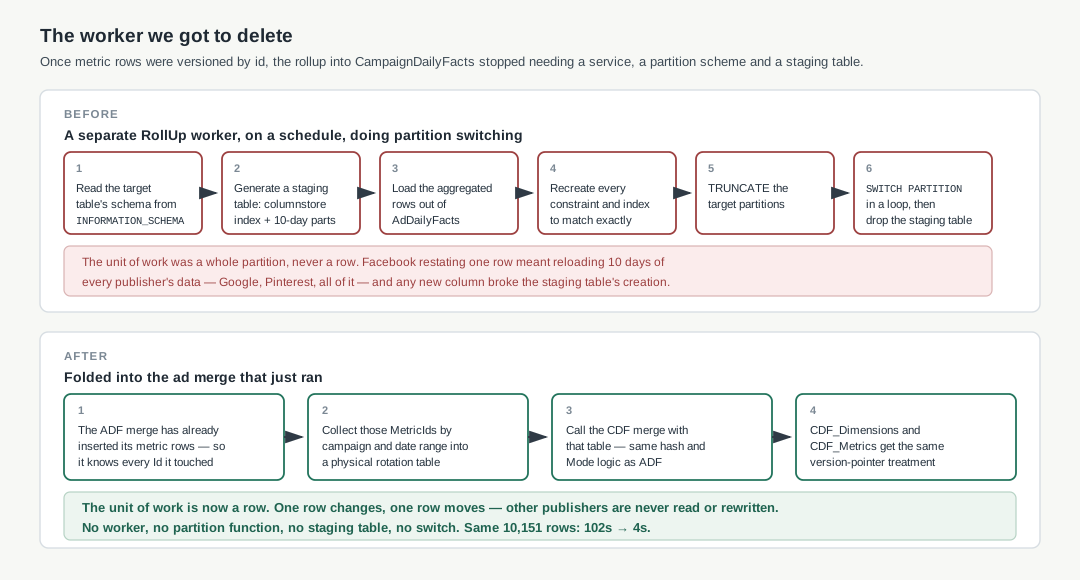
It collects those MetricIds into a physical rotation table and calls the campaign-level merge directly — same hash, same Mode, same version pointers. Only the metric rows that actually changed get read out of ADF_Metrics, and only those reach CDF_Dimensions and CDF_Metrics.
Which flips the whole thing around. The unit of work is now a row, not a partition. Facebook restates one row, one row moves. Google and Pinterest are never touched, never read, never rewritten. The rollup costs what the change costs, and nothing more.
The worker, the partition function, the staging table and the switch are all gone. On the same 10,151-row insert: 102 seconds on the rowstore profile, 4 seconds on the columnstore one.
We started this because we couldn’t add a column. We finished it with two monolithic tables retired and dropped, a fraction of the storage, faster reports, a rollup that only touches what changed, and one fewer service to keep alive at 3am.
The column limit was never the interesting part. It was just the thing that finally made twelve years of “just one more column” impossible to ignore — and the most satisfying artefact of the whole migration turned out to be a service that no longer needs to exist.