Reporting looks simple until real users, real accounts, real publishers, and real report rules enter the picture.
At DeltaX, we already had a Reporting AI Agent that could take a natural language request and turn it into a real report. The next question was: how do we make that capability available inside MCP-compatible assistants like Claude without asking the assistant to understand all of DeltaX Reporting?
That is where MCP came in.
This article is about the engineering challenges we hit while building a Reporting MCP server: identity, scoped access, tool design, response contracts, and hallucination control across AI clients.
What We Wanted To Build
We wanted a user to ask:
“Create a custom report for Facebook with campaign, clicks, impressions, and cost for the last 7 days.”
and get back a generated report link.
The user should not have to open a channel-specific app, manually configure every report option, download CSVs, or rebuild the same workflow outside DeltaX.
We also had one important rule:
The assistant can pass intent. DeltaX owns identity, scope, rules, and execution.
That rule shaped the architecture.
The Architecture
At a high level, the MCP server sits between the AI assistant and our existing Reporting AI Agent.
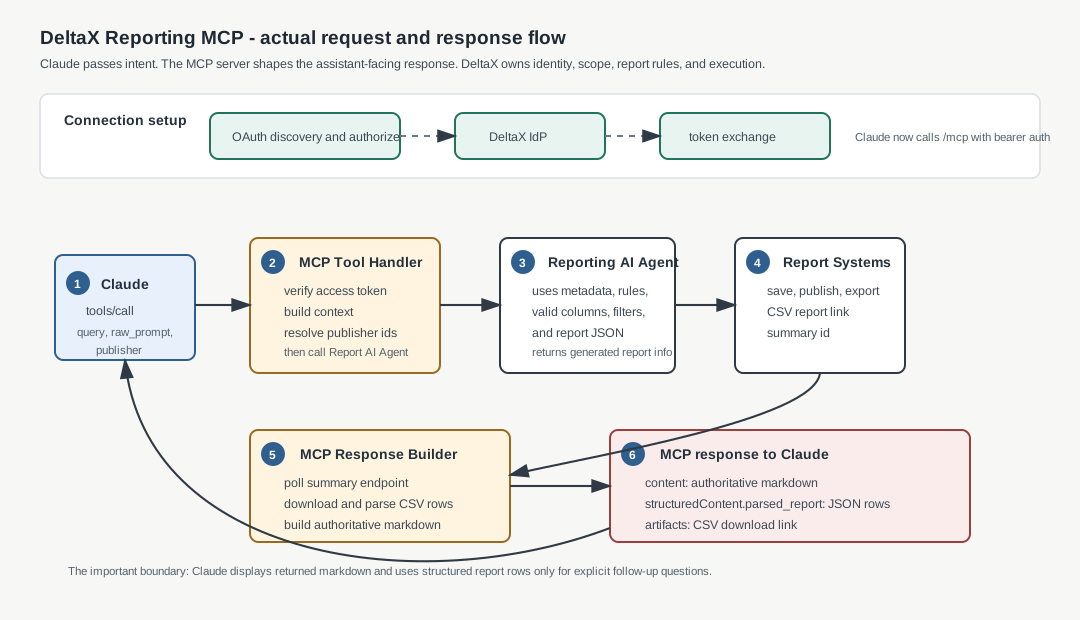
The assistant does not directly create DeltaX report JSON. It calls a small MCP tool with the user’s report request. The MCP server forwards that request to the Reporting AI Agent, which works with DeltaX APIs, metadata, rules, and report generation systems.
This kept the MCP surface simple and avoided moving product-specific reporting logic into the client.
Authentication: DeltaX As The Identity Provider
Before an MCP client can call our reporting tool, the user must connect it to DeltaX. OAuth answers this question:
Is this user allowed to access DeltaX Reporting through this assistant?
The assistant does not receive the user’s DeltaX password. The user signs in through DeltaX, and the client receives an authorized connection.
The basic OAuth endpoints are:
| Endpoint | Purpose |
|---|---|
GET /.well-known/oauth-authorization-server |
Lets the MCP client discover the authorization and token endpoints. |
GET /.well-known/oauth-protected-resource |
Tells the client which MCP resource is protected and where authorization happens. |
GET /oauth2/authorize |
Starts the connection flow and redirects the user to the DeltaX identity provider. |
POST /oauth2/token |
Forwards the authorization-code exchange to the identity provider and returns the access token. |
POST /mcp |
The authenticated MCP endpoint the client calls after connection. |
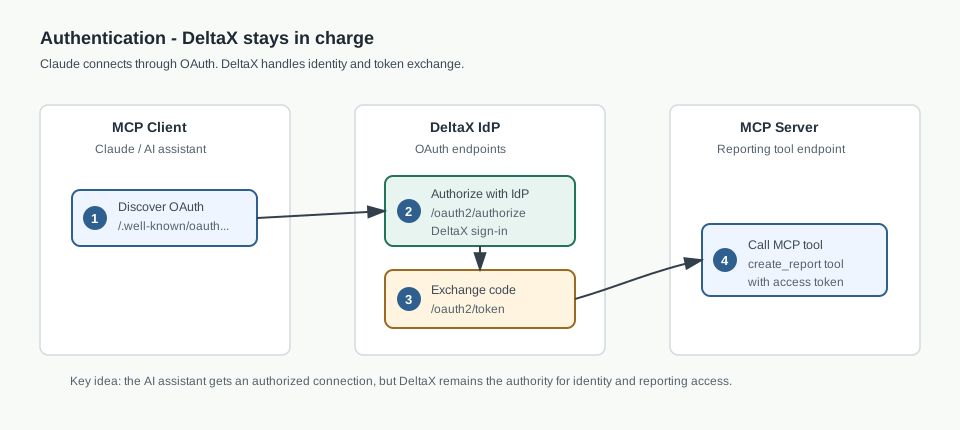
This keeps ownership clean. The client gets an authorized connection, but DeltaX remains the source of truth for identity and reporting access.
Connecting Claude As A Client
Claude was the client we used to validate the flow. From the user’s side, setup was intentionally simple: add a custom connector, enter the MCP server URL and OAuth client ID, then connect.
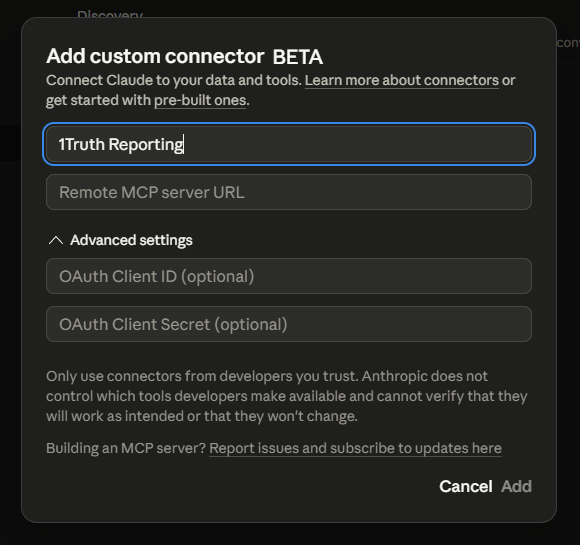
After the connector is saved, Claude shows it as a custom connector.

Claude then redirects the user to Adbox sign-in. The user authenticates with DeltaX, and the token exchange finishes in the background.
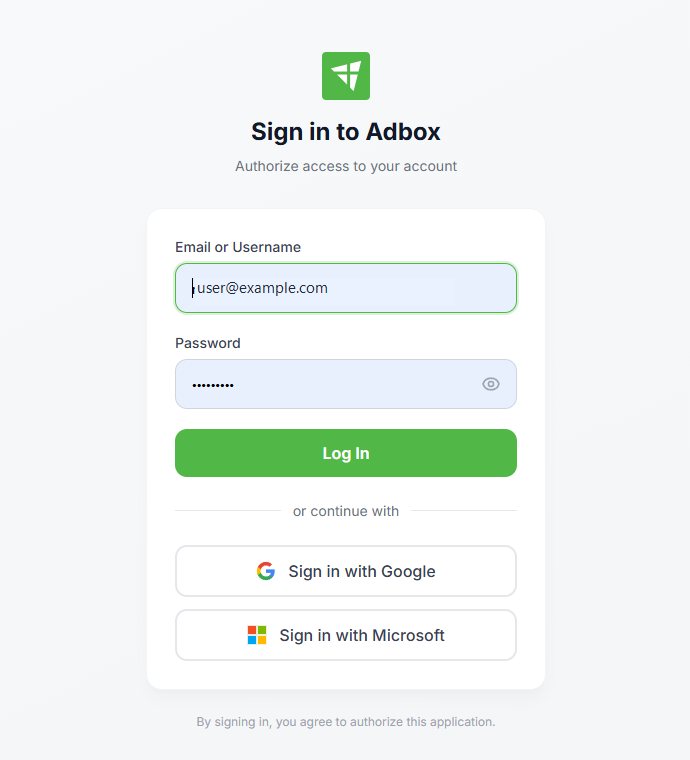
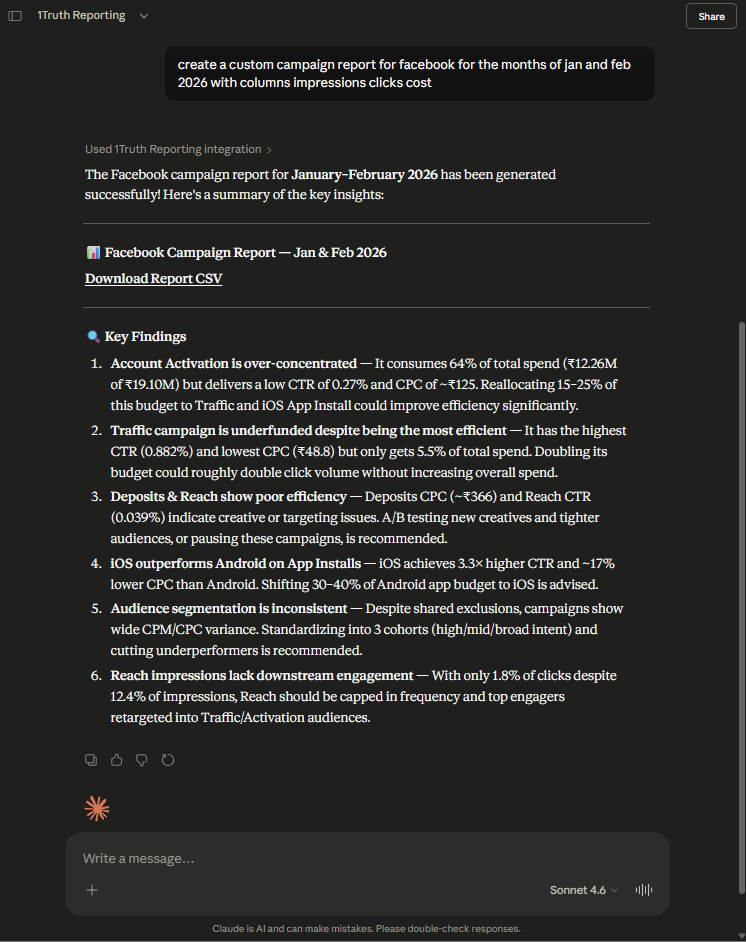
Once connected, the user can ask for a report in natural language.
How The Client Knows What To Call
The MCP server describes the tool to the client with instructions like:
You are connected to DeltaX Reporting.
Use the create_report tool when users ask for advertising or marketing reports.
The tool itself is intentionally small:
{
  "name": "create_report",
  "description": "Create an advertising or marketing report from a natural language request.",
  "inputSchema": {
    "type": "object",
    "properties": {
      "query": { "type": "string" },
      "raw_prompt": { "type": "string" },
      "publisher": { "type": ["string", "array"] },
      "is_not_supported": { "type": "boolean" }
    },
    "required": ["query", "raw_prompt"]
  }
}
The server injects authorization and connection context before calling the tool. The client does not provide those values.
So when the user says:
Create a custom report for Facebook with campaign, clicks, impressions, and cost for the last 7 days.
The client only sends:
{
  "query": "Create a custom report for Facebook with campaign, clicks, impressions, and cost for the last 7 days.",
  "raw_prompt": "Create a custom report for Facebook with campaign, clicks, impressions, and cost for the last 7 days.",
  "publisher": "Facebook"
}
That is the key design choice. The client passes the user’s intent and the explicitly mentioned publisher. DeltaX decides what that intent means in our reporting system and whether the user can access that publisher.
What The MCP Server Does
Once the MCP server receives the tool call, it validates the authenticated request, resolves allowed publishers, converts publisher names into publisher IDs, and calls the Reporting AI Agent with the user’s query and resolved publisher scope.
The Reporting AI Agent still owns report construction: report type, valid columns, date range, filters, report JSON, and export flow. But the MCP server owns the client-facing response.
After the report is generated, the MCP server:
- Polls the generated summary.
- Downloads and parses the CSV into JSON rows.
- Builds an authoritative markdown response.
- Returns the CSV as a downloadable artifact.
- Sends parsed report data as structured content for follow-up use.
This is where the MCP server became more than a connector. It became the boundary that decides what the assistant is allowed to say about the report.
The Hallucination Problem
The first version worked: the client could connect, call the MCP tool, and show the generated report back to the user.
But it also exposed the part we had to be careful with.
In the early version, the MCP response was centered around the generated artifact. We gave the assistant the report output, mainly the CSV/report link, and expected it to use that file.
That worked as a product flow, but it was not enough as an assistant flow. If the client could not download or read the CSV in some environments, it could still produce a confident-looking answer by manufacturing report data. The answer looked polished, but the numbers were not grounded in the generated report.
So we changed the MCP response contract. Instead of making the assistant depend only on the downloadable file, the tool response started carrying assistant-ready data:
{
  "status": "success",
  "content": [
    {
      "type": "text",
      "text": "# Report Generated Successfully\n\n## Report Summary\n..."
    }
  ],
  "structuredContent": {
    "usage": "optional_followup_only",
    "parsed_report": {
      "row_count": 25,
      "rows": []
    }
  },
  "artifacts": [
    {
      "type": "file",
      "mimeType": "text/csv",
      "url": "<report-link>",
      "expiresIn": 43200
    }
  ]
}
The markdown content is the primary user-facing response. The structured content is for follow-ups. The artifact is still there when the user wants the actual CSV.
We stopped asking the assistant to inspect a file and infer the report. We started giving it the report data it was allowed to talk about.
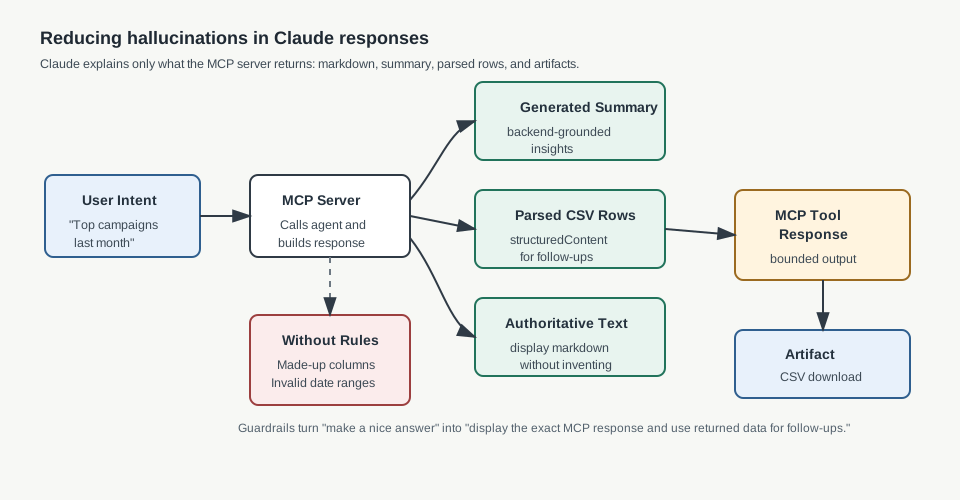
The guardrails were:
- Keep the MCP input small: pass intent, raw prompt, and optional publisher, not hand-written report JSON.
- Validate publisher access before calling the Reporting AI Agent.
- Parse the CSV into JSON rows inside the MCP server.
- Poll and return the backend-generated summary as the grounded insight source.
- Mark parsed report data as
optional_followup_only. - Tell the client the returned markdown is authoritative and should be displayed directly.
- Let DeltaX save, publish, and export flows validate the generated report.
This changed the problem from “Can the model create anything?” to “Can the model explain the report data we actually returned?”
That is a much safer question.
Handling Ambiguous Requests And Follow-Ups
Users do not always ask perfect questions.
Show me my top performing campaigns for last month.
“Top performing” could mean clicks, revenue, conversions, cost efficiency, or something else. We did not want to block the user every time a prompt was incomplete, so the agent follows a practical rule:
Generate the best possible report using reasonable assumptions, but return a clarification question when the request is ambiguous.
For example, the agent may create a campaign performance report and return:
I created a campaign performance report for last month using clicks and conversions. To best serve your needs, which metric should define top performing: conversions, revenue, clicks, or cost?
This gives the user something useful immediately while still allowing correction in a follow-up.
If the first prompt was:
Create a campaign report for Facebook.
and the next prompt was:
Can you structure it by top 5 campaigns by cost?
we should not treat the second prompt as a brand new request. The client has conversation context, and the MCP server has parsed report data, so the next tool call can preserve the original campaign-report intent and add the top 5 by cost requirement.
The same pattern helped with comparisons:
How did my campaigns do compared to last week?
Here the agent infers a comparison intent and returns data for both windows, for example this week versus last week. The assistant can then explain the comparison using the JSON data and insights returned by DeltaX.
What We Learned
Building this Reporting MCP server reinforced that MCP is best treated as a bridge, not the brain.
AI assistants are good at understanding user intent. DeltaX is responsible for identity, reporting rules, data access, and execution. The MCP server connects those two worlds without moving core business logic into the assistant.
We also learned that tool descriptions matter. The words we use in the MCP tool definition directly affect when the client decides to call the tool.
And finally, reliability comes from constraints. The Reporting AI Agent is useful because it works with valid metadata, rule files, structured JSON, and downstream validation.
The pattern we want to carry forward is simple:
AI assistants understand intent. Product systems execute with authority.