While the world was celebrating Valentine’s Day, we at DeltaX were going through a bit of a heartbreak moment. On February 14th, we said goodbye to a tool that had been with us since the early days of the company — Jira.
It’s not you, it’s us.
As DeltaX evolved, so did our needs. What started as a convenient solution eventually became a realization: the way we work had become more specific. We had evolved into products and teams. Our processes had structure. And ultimately, everything boils down to tasks — and how we manage them.
This is the story of that transition. This is the story of our new chapter: Project Management — the idea and the architecture behind it.
What Is Project Management?
Project Management is our in-house system — designed, built, and owned entirely by DeltaX. It is a fully containerized, microservices-based platform that operates as a completely independent system. It has its own:
- Vue based UI container
- API container
- Proxy Server container
- PostgreSQL Database container
- Elastic container
- Background processing containers(migrations, recurring jobs)
- Backup container
- Administrative utilities container (xata dbadmin)
The system is designed to be plug-and-play. A new instance can be provisioned using a single Docker Compose command, which orchestrates multiple containers and brings the entire ecosystem online.
Plug and Play System Design
The architecture of Project Management is built around:
- Isolation
- Multi-instance capability
- Clean traffic routing
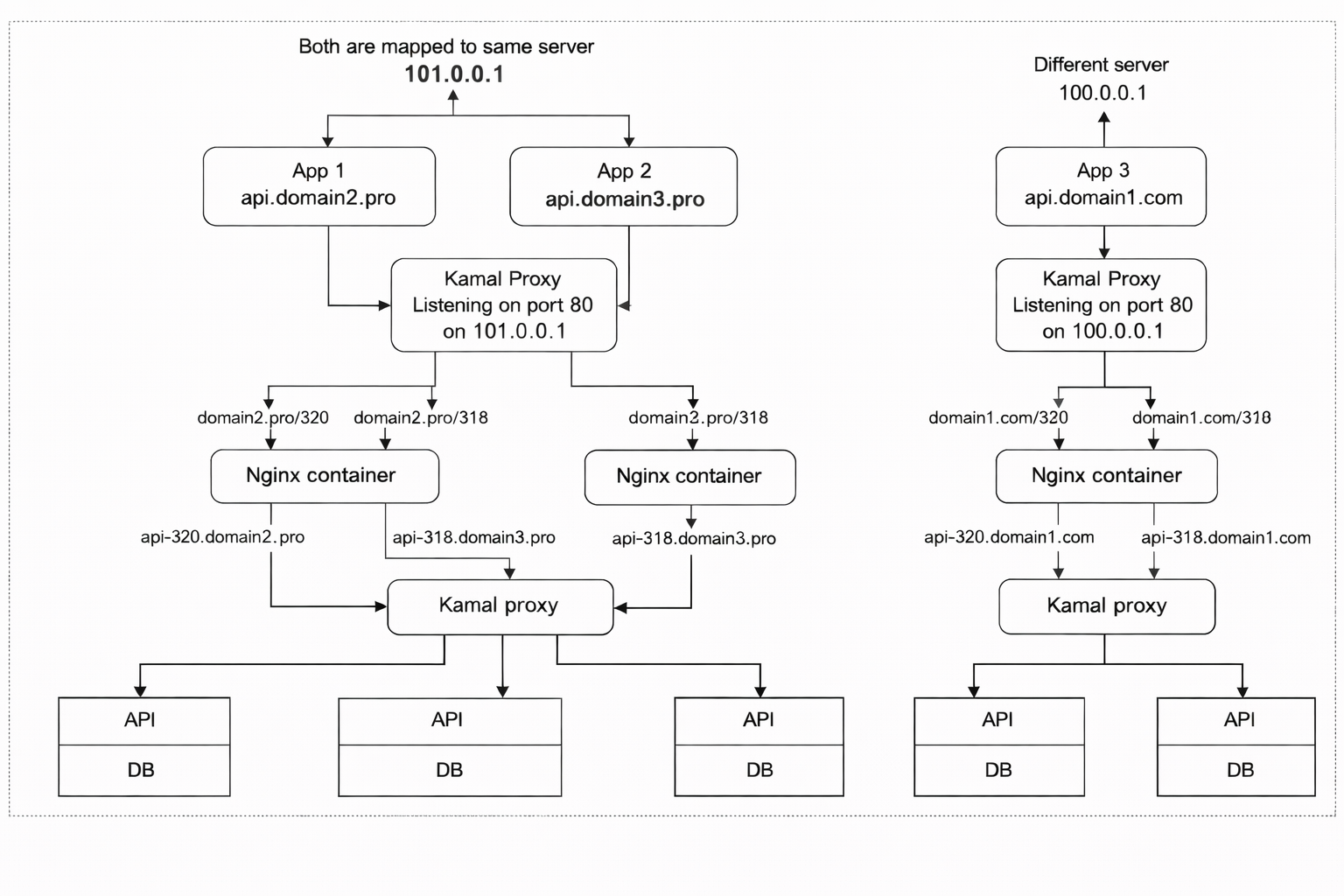
To explain the architecture, let’s walk through two examples.
Example 1 — Dedicated Server Deployment
Assume a separate instance of the application runs at: api.domain1.com on server: 100.0.0.1
Let’s say we configure one instance for two organizations. Org IDs (for example: 318 and 320).
Requests may look like:
- api.domain1.com/318
- api.domain1.com/320
Traffic Flow
- Incoming requests hit Kamal Proxy listening on port 80 of the server.
- Kamal routes traffic to the Nginx container.
- Nginx rewrites the request to:
api-318.domain1.comapi-320.domain2.com
- The request is internally intercepted again by Kamal.
- Kamal forwards it to the appropriate application container.
- The API processes the request and interacts with its dedicated database.
Each org-level instance is logically isolated, even if the same underlying database is used for storage, even when running under the same domain.
Example 2 — Multiple Applications on the Same Machine
Now consider a single machine: 101.0.0.1
We deploy two separate applications:
api.domain2.proapi.domain3.pro
For domain2.pro, we configure two portal-level instances:
- Portal 318
- Portal 320
For domain3.pro, we configure one instance:
- Application ID 318
Traffic Flow
- Incoming requests hit Kamal Proxy (port 80).
- Based on the domain, traffic is routed to the appropriate Nginx container. we have two Nginx container’s, as two applications are deployed
- Nginx rewrites the request.
- Kamal intercepts again and routes it to the respective application container.
- The API processes the request and interacts with its dedicated database.
Even though these applications share the same infrastructure (same machine), they remain isolated at the container level.
From both examples, it is clear how the system supports plug-and-play deployment at any level.
This architecture ensures:
- Isolation per organization or portal
- Ability to run multiple domains on shared infrastructure or isolated infrastructure for complete server-level isolation
- Clean domain-based routing
- Independent scaling
- Controlled environment separation
Whether deployed on shared infrastructure or on a completely isolated server, each instance remains self-contained and predictable.
Was This Meant to Replace Jira?
No.
Project Management was never conceived as a “Jira replacement.” The original ambition behind the system was much simpler — and much more focused.
We wanted to build a task management engine that could be embedded into our products like:
- BrandX
- Birdigo
The goal was to treat tasks as a primitive inside our ecosystem, idea was to record the tasks at the BP level, any level where the tasks were executed and where the work actually happened.
The purpose was simple:provide lightweight tracking without external dependency
It was meant to be embedded, not standalone. But over time, it became clear that everything could be modeled as a task, we had everything we needed to replace Jira, it’s not a Jira clone.
What’s now and What’s Next
Project management today is more than a task tracker.
It is the central system for recording and tracking work across disciplines at DeltaX, including:
- Engineering
- Product
- ACE
- COE
- Operations
- Cross-functional teams
The system is used for:
- Backend for BrandX Task Management through DeltaX.Api
- CoE work tracker
- Project managment for Engineering and Product with Bitbucket integration
- Custom workflow processes
The Future: Everything Is a Task
- A feature is a task.
- A bug is a task.
- A lead is a task.
- A sale is a task.
- A media plan is a task.
- A support ticket is a task.
- An operational escalation is a task.
- A strategic initiative is a task.
Tasks are the smallest executable unit of work and once everything is modeled as a task, orchestration becomes possible. AI-driven orchestration.
Future capabilities will include:
- AI-driven support ticket system
- AI-driven task creation and intelligent task assignment
- Automated dependency management
- Context-aware workflow transitions
The goal is to connect everything we have built — products, operations, reporting, client workflows — under a unified task orchestration layer.
A single abstraction: Task, through that abstraction, we aim to Orchestrate the entire organization, and that’s Oneness through Task Management